SAVED PRODUCTS0
LibraryWELCOME BACK
Good afternoon
Everything you need to prepare, manage and print your labels.
Getting started
Follow these quick steps to create your first two-label product.
LABELS PRINTED0
All timeDEFAULT PRINTERNot set
Connected setupRecent products
Your latest saved products, ready to reuse.
YOUR PRODUCT LIBRARY
Products
Add and manage the food products you sell.
SAVED PRODUCTS
Your library
Edit, duplicate, delete or print any saved product.
STYLE YOUR LABELS
Label designer
Choose the template, fonts and layout. Product details are managed in Products.
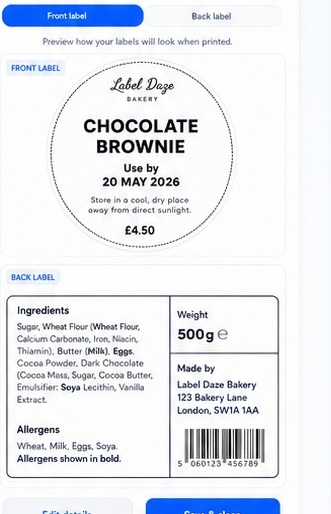
PREVIEW A SAVED PRODUCT
Choose your style
Select a product from your library to see your design using real content.
Style onlyNothing you change here edits the saved product information.
LIVE TWO-LABEL PREVIEW
LABEL TYPOGRAPHY
Choose a font for every section
Change a font below and watch the live label preview directly above update instantly.
LIVE TYPE PREVIEW
Your Business
DOUBLE CHOCOLATE COOKIE SANDWICHIngredients: wheat flour, butter, eggs and chocolate
USE BY END 08 AUGKeep refrigerated below 5°CBusiness address · websiteBusiness nameBrand name beside or below the logo
Product nameMain product heading
IngredientsIngredient declaration
Use-by dateDate emphasis
Storage wordingRefrigeration and handling text
Address / footerBusiness details at the bottom
FAST PRINTING
Batch print
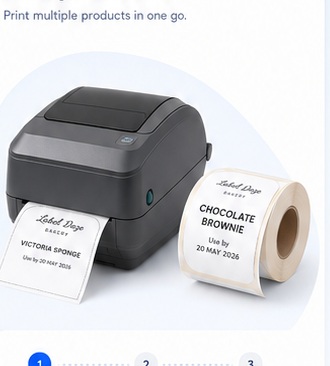
Print the two linked labels together, or choose one side only.
PRINT YOUR LABELS
Fronts first. Backs second.
Select your products and quantities. If you choose both labels, all front labels print first, followed by the matching ingredients labels in exactly the same order.
0 products · 0 labels
TODAY’S WORKFLOW
Today’s production
Type what you are making and build the full print batch in seconds.
Use one item per line. Put the quantity first. Matching saved products are selected automatically.
Production list
Review quantities before printing.
SMART LABEL BUILDER
Ingredient assistant
Turn rough recipe notes into a cleaner label-ready ingredient declaration.
GENERATED LABEL
LABEL STYLES
Template library
Choose a genuinely different label style. The selected template changes both preview and printed PDF.
WORKSPACE
Settings
Manage your business details and label branding.
ACCOUNT & CLOUD
Your account
Manage sign-in, cloud sync and workspace access.
Label Daze user
Not signed in
Account statusLocal test mode
WorkspaceLocal device
Keep everything backed up
When Firebase is connected, products, logos, templates and settings sync securely across devices.
Local storage activeChanges are currently saved on this device.
Password & access
OWNER CONTROL CENTRE
Admin dashboard
Live Label Daze sign-ups, trials and subscriptions.
Customers
Loading live account data…
| Joined | Plan | Status | Trial ends | |
|---|---|---|---|---|
| Loading… | ||||
Live services
Firebase authenticationConnected
Cloud databaseConnected
Admin accessOwner only
Email notificationsSet up in Netlify
START YOUR FREE TRIAL
Choose your plan
Try Label Daze free for 7 days. Your chosen monthly plan starts automatically afterwards unless you cancel.
No charge today
Choose Basic or Pro and enter your payment details securely. Cancel any time before your trial ends and you will not be charged.
Basic
£14.99/month after trialUnlimited products, UK allergen detection and batch printing.
Pro
£19.99/month after trialCustom branding, label templates, production tools and advanced controls.